AI TOOL / #07462
Vision AI
A Chrome extension that enables AI-driven insights based on screenshot data.
Introduction
Chrome extension for AI-powered insights from screenshots.
What is a Vision AI Chrome extension/plug-in?
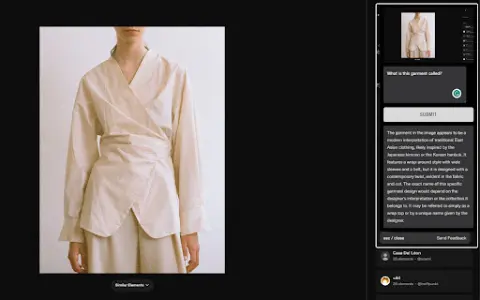
Visual AI is a Chrome extension that combines screenshot functionality with AI-driven insights to enhance online information search. It allows users to capture any portion of a web page, add notes or questions, and receive AI-generated responses based on the context of the captured image.
How to use the Vision AI Chrome extension/plug-in?
Install the Visual AI Chrome extension. Use CTRL + SHIFT + Y to take a screenshot, and then add any notes or questions you have. Visual AI will analyze the screenshot and provide an AI-generated response.
The core functions of the Vision AI Chrome extension/plugin
Screenshot capture
Interactive AI Suggestions
Seamless browser integration
Suitable for a wide range of applications in various fields
Privacy and Security
Interactive AI Suggestions
Seamless browser integration
Suitable for a wide range of applications in various fields
Privacy and Security
Related
thisorthis.ai
An AI model comparison platform used for testing prompts and analyzing AI responses.
Uwear.ai
The AI platform generates model clothing photos based on tiled images, replacing traditional photography.
Real Or AI
RealorAI: A tool that uses interactive tests to distinguish between real images and those generated by AI.
Lore Sage
Lore Sage creates a complete fantasy world for desktop role-playing games, based on your ideas and concepts.
AI Prompt Wars
The first decentralized exchange on the NEAR blockchain, offering cross-chain liquidity and DeFi-based asset management services.
Yeti Confetti Kids by Lirvana Labs
An educational app that uses artificial intelligence to provide personalized learning experiences for children.