AI TOOL / #07222
ReadImage
Extract, edit, and copy text from images on web pages.
Introduction
Extracts, edits, and copies text from images on web pages.
What is Image Text Extractor ai chrome extension/plugin?
This extension allows users to extract text from images displayed on web pages. It supports common image formats such as jpg, jpeg, png and bmp. After extraction, the text can be edited and copied.
How to use Image Text Extractor ai chrome extension/plugin?
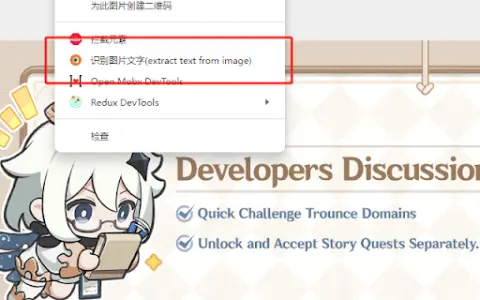
Hover your mouse over the image, right-click and select "Extract text from image". Press "Ctrl + Q" to view the extracted text on the extension page, where it can be edited and copied.
Image Text Extractor ai chrome extension/plugin core features
Extract text from images on web pages
Edit extracted text
Copy extracted text
Edit extracted text
Copy extracted text
Related
Vana
Vana is a network that enables users to control and contribute their data, allowing for the decentralized management of artificial intelligence systems based on user-generated information.
Appen
Appen provides data and services to enhance the performance of AI models and accelerate the development of AI technologies.
GPT Duel
A website where users can watch and participate in debates conducted using the GPT model.
Decide.Quest
An online interactive storybook written by AI.
Trivia AI – Guess The Words
A photo quiz game that uses AI to generate images, designed to test your guessing abilities.
DeepGamer
A variety of free AI online games.