AI TOOL / #07148
ORC Text Snap
Tools used to extract text from images, videos, or PDF files using OCR technology.
Introduction
A tool to extract text from images, videos, or PDFs using OCR technology.
What is an Optical Character Recognition AI Chrome extension/plug-in?
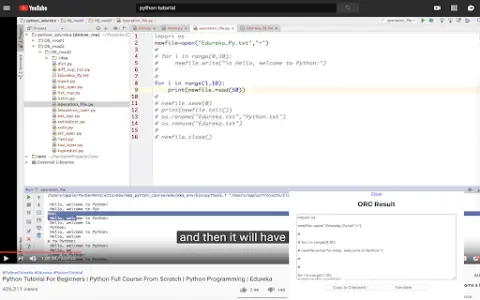
This is a practical tool that allows users to extract text from images, videos, or PDF files with just one click, eliminating the need to re-enter the text character by character. A common use case for this tool is copying any text contained in YouTube videos or tutorial materials in image format. This tool utilizes the lightweight OCR engine Tesseract.js to extract text from images.
How to use the Optical Character Recognition AI Chrome extension/plug-in?
1. Click the icon and then select the area or image that contains the text you want to extract.
2. Wait for the tool to complete the text extraction process.
3. The extracted text will be displayed in a text box. You can click the “Copy” button to copy it to the clipboard and then paste it anywhere using Ctrl + V.
4. You have the option to translate the extracted text into the language of your choice.
5. On the settings page, you can specify the OCR language as well as the target translation language.
The core functionality of the Optical Character Recognition AI Chrome extension/plug-in
Extract text from images, videos, and PDF files.
One-click text extraction
Copy the text to the clipboard.
translation options
OCR language selection
One-click text extraction
Copy the text to the clipboard.
translation options
OCR language selection
Related
PO assistant
AI-driven seamless Jira ticket creation tool.
Prepostseo
Free online SEO tools and AI writing assistants.
Calorific – Nutrition Tracker
Nutrition tracking apps that utilize artificial intelligence and barcode scanning make it easy to keep a record of what one has eaten.
Camp
Camp enhances screenshots by extracting information regarding text, characters, locations, and music.
ScholarAI
An AI platform that generates notes and educational materials for students.
Doc2cart
Use OCR technology to automate the extraction of document data for use in e-commerce.