AI TOOL / #06759
Chromesthesia
Capture audio tagged with relevant labels and use various audio recognition services to analyze them.
Introduction
Captures tab audio and identifies it using various audio recognition services.
What are Audio Recognition Services, and what are the Chrome extensions/plugs related to AI?
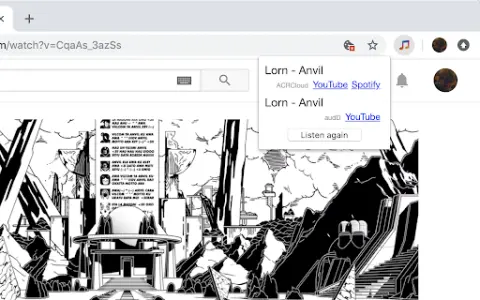
This service captures the audio being played within browser tabs and sends it to audio recognition services. Currently supported services include audD (no account required; 10 free requests per day), ACRCloud (account needed, but a free plan is available), and AudioTag (account needed, but a free plan is available).
How to use the Audio Recognition Services Chrome extension?
This service captures the audio being played within browser tabs and automatically sends it to the configured audio recognition services (such as audD, ACRCloud, or AudioTag). The identified song information is then returned.
The core functionality of the Audio Recognition Services AI Chrome extension/plug-in
Capture audio from a browser tab
Integration with various audio recognition services (audD, ACRCloud, AudioTag)
Integration with various audio recognition services (audD, ACRCloud, AudioTag)
Related
Looppanel – Record & Transcribe Video
Looppanel automatically records and transcribes meetings and provides AI-based insights for user research.
SenseProfile
AI-based conversation analysis platform for understanding meaning and emotional context.
Scribie
Accurate and affordable human-verified transcription services, enhanced with AI.
Read Speaker Coach
A meeting assistant designed for transcription, summarization, and cross-platform AI applications.
Talk with GPT Extensions
A Chrome extension for conversing with OpenAI's GPT-3 via voice or text.
Two Way Voice for Bing AI
Bing AI's voice interaction capabilities enable support for voice-based questions and answers.