AI TOOL / #06738
Chat GPT Logger
An extension tool used to save ChatGPT conversations as local text files.
Introduction
Extension to save ChatGPT conversations to a local text file.
What is the GPT Chat Logger AI Chrome extension/plug-in?
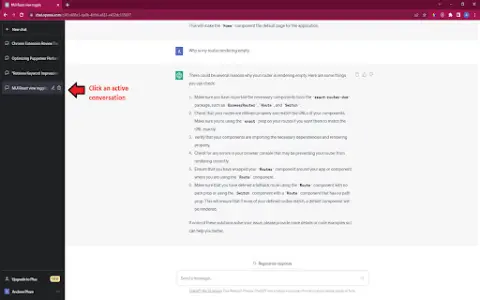
The GPT Chat Recorder is an extension that allows you to save active conversations from Chat GPT as text files on your computer. All you need to do is click on an ongoing conversation, then click the save icon, and finally save the file to your device. These steps are also illustrated in the image provided.
How to use the GPT Chat Logger AI Chrome extension/plug-in?
Click on an active conversation within ChatGPT, select the save icon, and then save the file to your computer.
The core functionality of the GPT Chat Logger AI Chrome extension/plug-in
Save the ChatGPT conversation as a local text file.
Related
HeardThat
Artificial intelligence-driven applications enhance hearing by distinguishing between speech and noise.
VoiceCanvas
An AI-based multilingual speech synthesis and cloning platform with natural language processing capabilities.
AI Music Sampler
AI-powered audio track separation tool.
Vaanee AI Engine
Vaanee AI is a generative voice AI toolkit designed to create realistic voice-over narration.
Get Any Link Metadata
An AI integration platform that connects various AI models through a unified API.
Remchee
Chrome extension to access ChatGPT directly through the OpenAI API.