AI TOOL / #06632
Talk to GPT
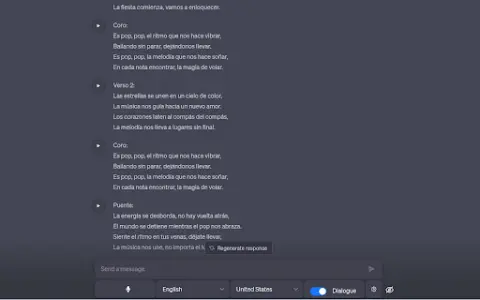
A Chrome extension designed for voice interaction with ChatGPT, supporting multiple languages and error correction features.
Introduction
Chrome extension for voice interaction with ChatGPT, supporting multiple languages and error correction.
What is the Talk to GPT AI Chrome extension/plug-in?
“Dialogue with GPT” is a Chrome extension that enables users to interact with ChatGPT on chat.openai.com via their microphone. It utilizes the browser’s speech recognition API to convert spoken audio into text and supports multiple languages. Users can also adjust the language settings and enable ChatGPT’s error-correction functionality.
How to use the Talk to GPT AI Chrome extension/plug-in?
Install the Talk to GPT Chrome extension. Visit chat.openai.com and use your microphone to utter your query. This extension will transcribe your voice and send it to ChatGPT.
The core functionality of the GPT AI Chrome extension/plug-in.
Provide voice input for ChatGPT.
Multi-language support
Language level adjustment
ChatGPT corrects errors.
Multi-language support
Language level adjustment
ChatGPT corrects errors.
Related
lifedata.ai
LIFEDATA: WhatsApp data infrastructure for AI, revenue recovery and omnichannel solutions.
theGist
Artificial intelligence platforms empower revenue teams by automating insights generation and workflows.
Agent One
No-code platform for building and hosting custom AI chatbots and agents.
GaliChat
Build, train, and share AI agents for use in customer support and lead generation.
Runner H
Runner H: AI agent for automating complex tasks and network automation.
unitQ GPT
An artificial intelligence-based platform designed to extract insights into product quality from user feedback.