AI TOOL / #06171
Patsa – AI-powered Meeting Copilot
A Chrome extension that enables real-time transcription and AI-powered Q&A during online meetings.
Introduction
Chrome extension for real-time transcription and AI-powered Q&A during online meetings.
What is the Patsa AI Chrome extension/plugin?
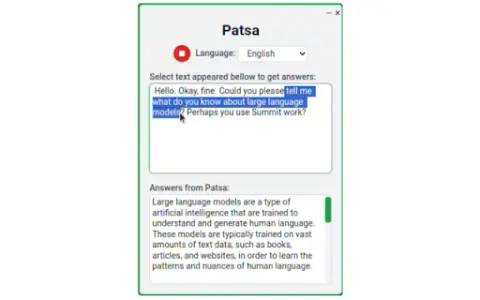
Patsa is a Chrome browser extension designed to enhance online meetings on platforms such as Google Meet, Zoom, and Teams. It transcribes other participants’ speech in real time and lets users select transcribed text to ask AI questions, providing instant information and answers.
How do I use the Patsa AI Chrome extension/plugin?
1) Launch the Patsa extension in any online meeting in Chrome. 2) Click the "Start Transcribing" button to transcribe what the other participants are saying. 3) Select the transcript text you want to ask the AI about, and you'll receive an instant response from the AI.
Core features of the Patsa AI Chrome extension/plugin
Real-time transcription of participants’ speech
AI Q&A based on transcribed text
AI Q&A based on transcribed text
Related
OpenChit
An AI chat client with text, voice, and knowledge base capabilities.
Heyday
An AI-powered memory assistant that helps you recall forgotten information while you are browsing the web.
THEO: Your-Context-Powered AI
An AI assistant designed for startups, which provides structured business context for strategic AI applications.
Docsie 2.0
An AI-driven platform designed for creating and managing product documentation and knowledge bases.
Crane
An AI-driven personal knowledge base that provides daily summaries of the content one has read.
Dokkio Sidebar
The Dokkio Sidebar automatically identifies and organizes web pages, files, and messages, thereby creating a searchable knowledge base.