AI TOOL / #04050
AI Roundtable
Ask a question and receive answers from multiple AI assistants.
Introduction
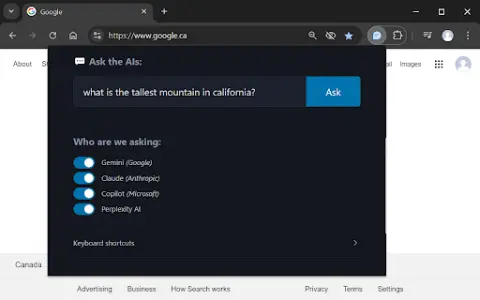
Ask one question, get answers from multiple AI assistants.
What is a Multiple AI Assistants Chrome extension/plug-in?
This website allows users to submit questions at once and receive answers from multiple AI assistants. Users can customize which assistant they want to use for their queries. The website also provides keyboard shortcuts, making it easy to access various functions quickly.
How to use the Multiple AI Assistants Chrome extension?
Use the shortcut keys Ctrl/Cmd + Shift + Q to open the query window and start typing your question. Use Alt + 1 to switch to Gemini, Alt + 2 to switch to Claude, Alt + 3 to switch to Copilot, and Alt + 4 to switch to ChatGPT.
The core functions of various AI Assistant extensions/plugins for Chrome.
Query multiple AI assistants simultaneously
It is possible to customize the selection of AI assistants.
Convenient and fast keyboard shortcuts
It is possible to customize the selection of AI assistants.
Convenient and fast keyboard shortcuts
Related
PrepGenius
An artificial intelligence-based platform for exam preparation, offering personalized learning and interactive practice opportunities.
AI Reading Assistant
An AI-powered tool for creating presentations, documents, and webpages.
Stonly
A platform based on knowledge management that utilizes artificial intelligence and automation to enhance customer service.
Review My eLearning
An AI-powered online learning review platform that simplifies the process of providing course feedback and ensuring quality.
Hedy AI
AI-assisted meeting and classroom tools that provide real-time insights and recommendations.
packback.co
An artificial intelligence-based learning platform designed to support discussion, writing activities, and teacher guidance.